Your family’s wall display, on the tablet you already own.
No special screen to buy. FamDisplay is a digital family calendar for the old iPad, Android or Fire tablet, or TV you already have: everyone’s calendars, routines, to-dos, rewards, tonight’s dinner and the grocery list, plus a map of everywhere you’ve been together.
Free for 14 days. No credit card. No hardware to buy.
Bring your own screen. Skip the $169.99 one.
Skylight and other family calendars start with their own hardware. FamDisplay runs on what’s already in your house, so the subscription is the whole cost.
- The old iPad in a drawer
- Android and Fire tablets
- A smart TV or Fire TV, in its browser
- Any web browser
- Skylight, first year
- $169.99 screen plus subscription
- ~$249
- FamDisplay, first year
- $4.99 a month, no hardware
- $60
See how FamDisplay compares to Skylight · Hearth, Cozi and DAKboard
Seven screens. One glance from across the kitchen.
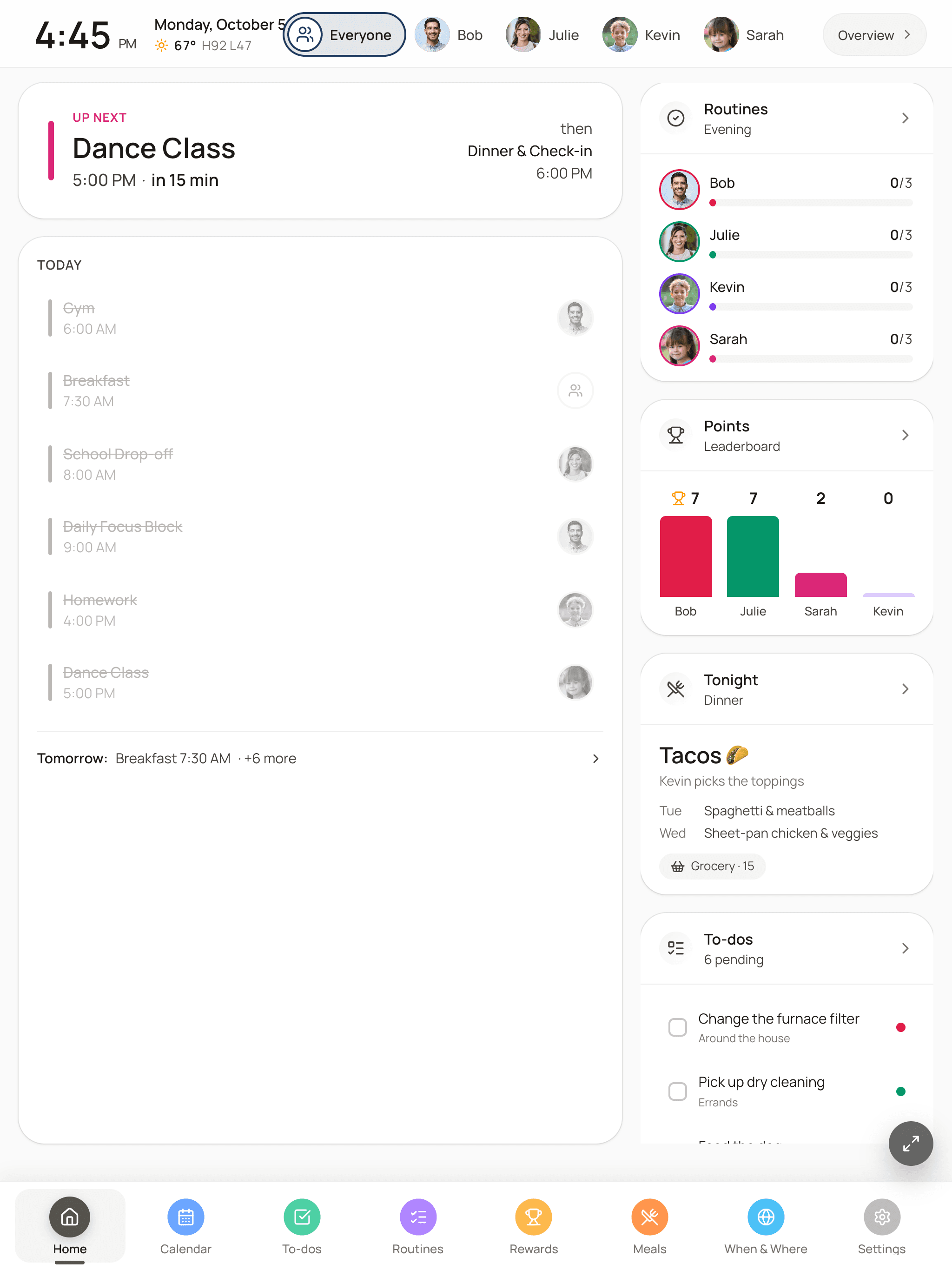
These are real screens from the wall, not mockups. Tap through what your family sees all day.

Home. What's next, today's plan, routines, points, tonight's dinner and the to-do list on one screen.
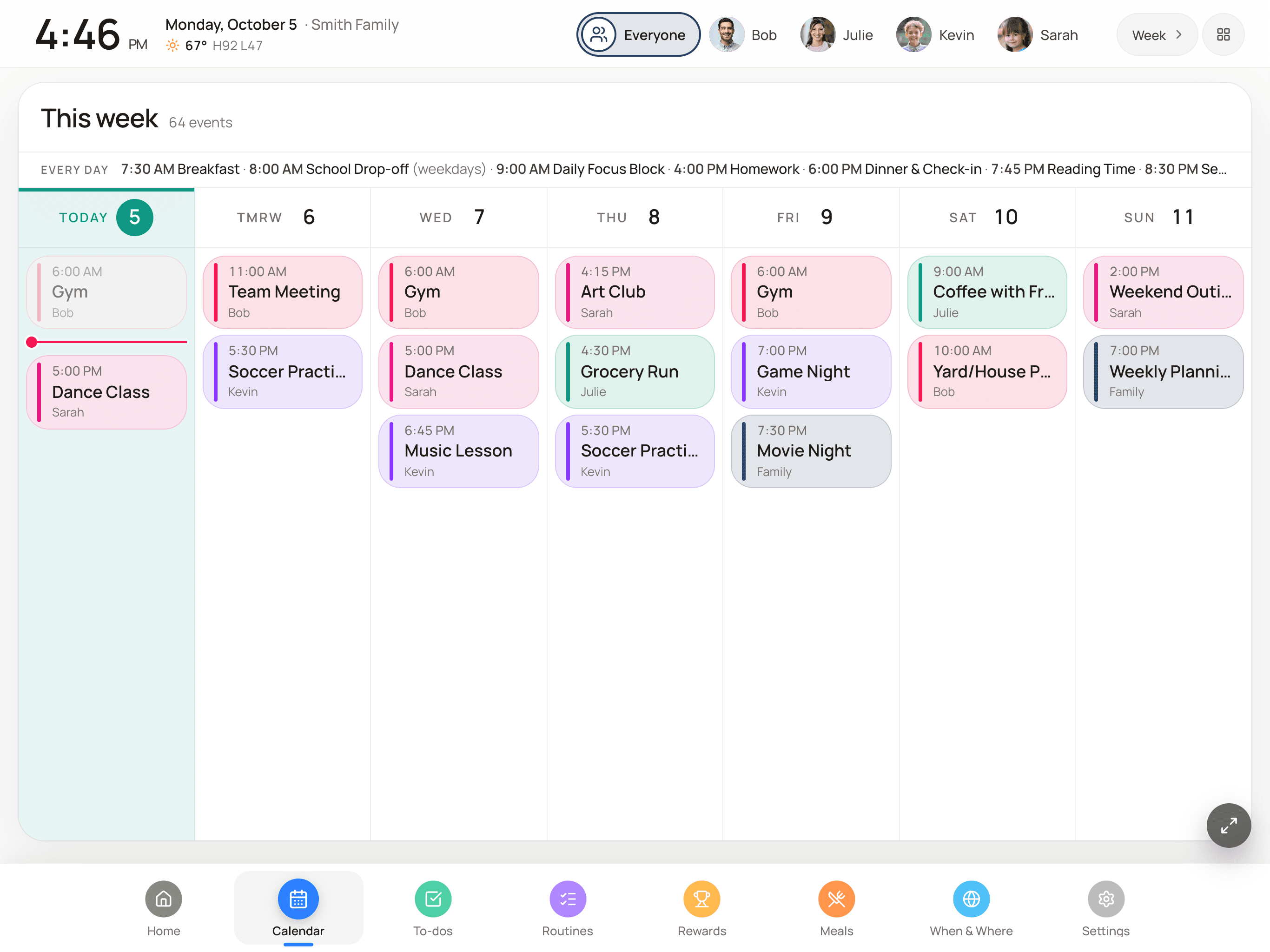
Every calendar, one glance.
Each person gets a color, so you can read the day from across the kitchen. School, sports, work and personal calendars all land in the same view.
- Google Calendar, iCloud, Outlook and any ICS feed
- Sports schedules from TeamSnap, TeamSideline and LeagueApps
- Week, agenda, timeline and family-column layouts
- Countdowns to birthdays and trips in the top bar
- Night mode dims the screen after dinner
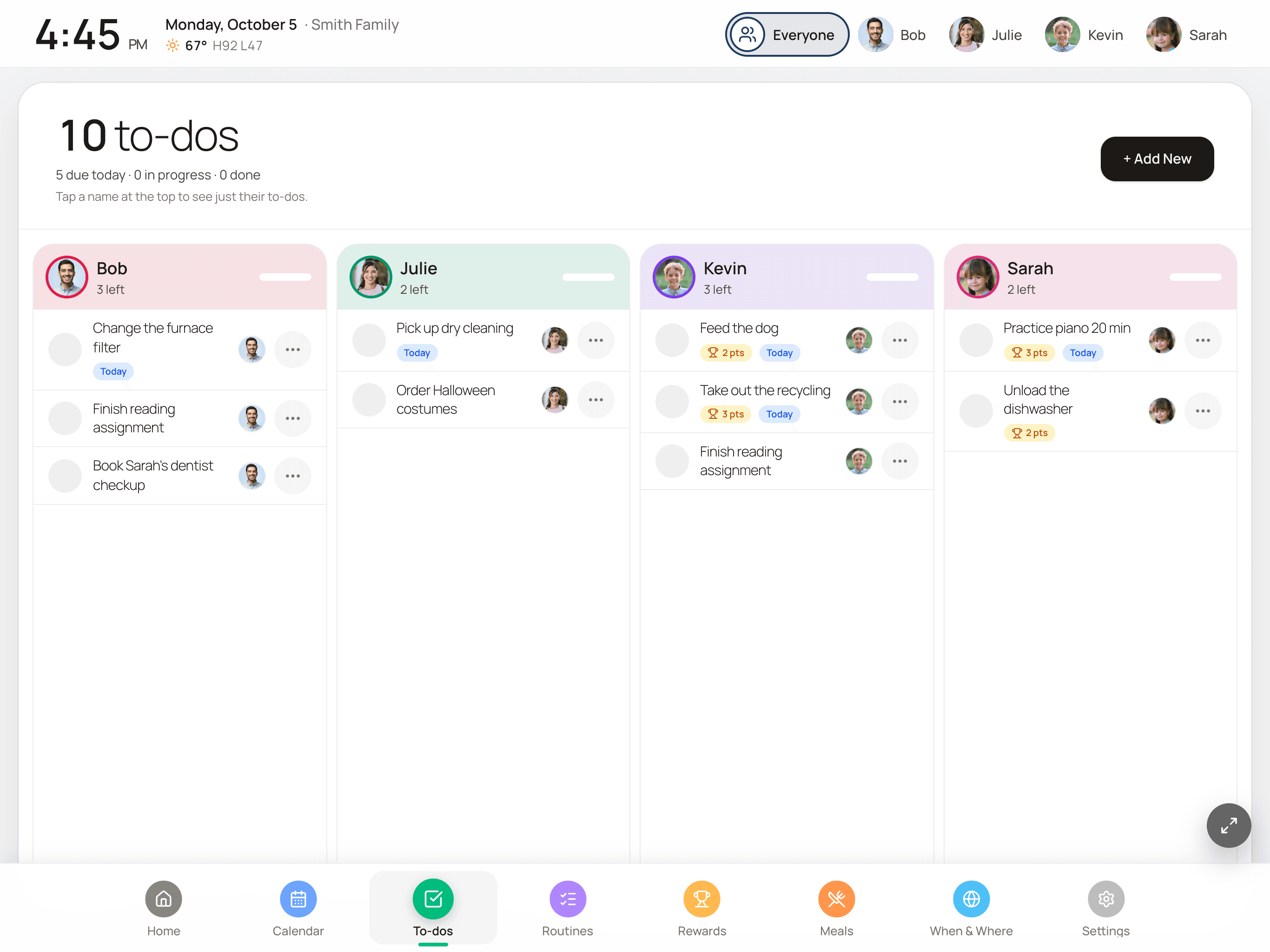
To-dos everyone can see
Give a task to one person or the whole family. It stays on the wall until someone taps it done, so nobody has to be reminded twice.
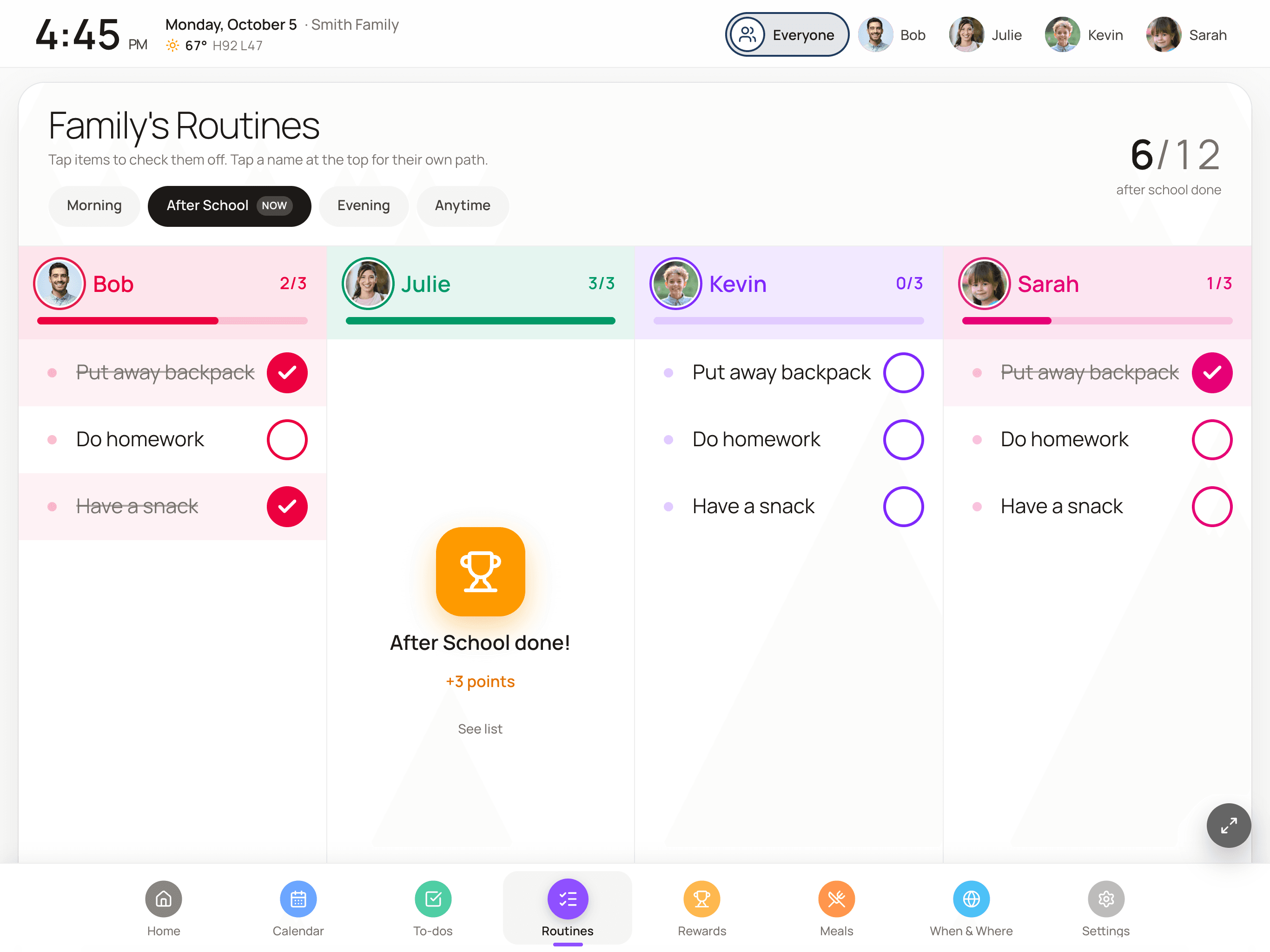
Routines kids run themselves
Morning, after-school and bedtime checklists. Kids tap each step on the screen, the progress bar fills, and it all resets for tomorrow.
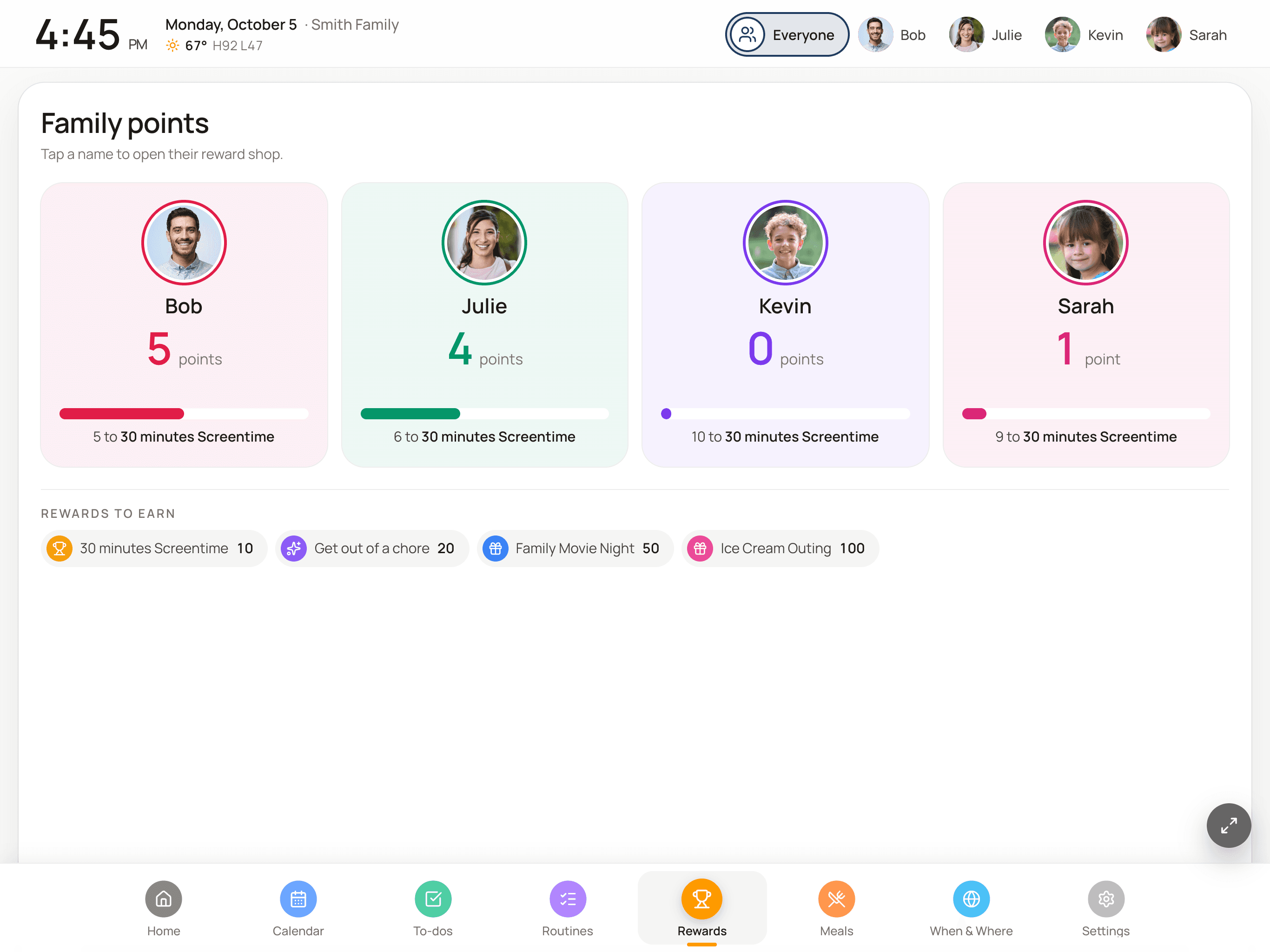
Rewards worth working for
Finished routines and to-dos earn points. You decide what points buy: screen time, allowance, or picking Friday's movie.
New: Meals & Grocery
“What’s for dinner?” answered before anyone asks.
Plan the week’s dinners and the wall shows tonight’s on Home. The grocery list lives right next to it, on the wall and on every phone in the house.
Plan the week from your phone
Tap a night and type what's for dinner. Your recent dinners come up as suggestions, and Repeat last week fills a quiet week in one tap.
A grocery list that sorts itself
Type “milk, tortillas, cilantro” and each item lands in its aisle. Add ingredients while you plan a meal and they show up tagged for that dinner.
Shop together, in real time
Check items off in the store and within seconds the list updates on everyone's phone and on the wall. Typing “apples” twice won't put them on the list twice.
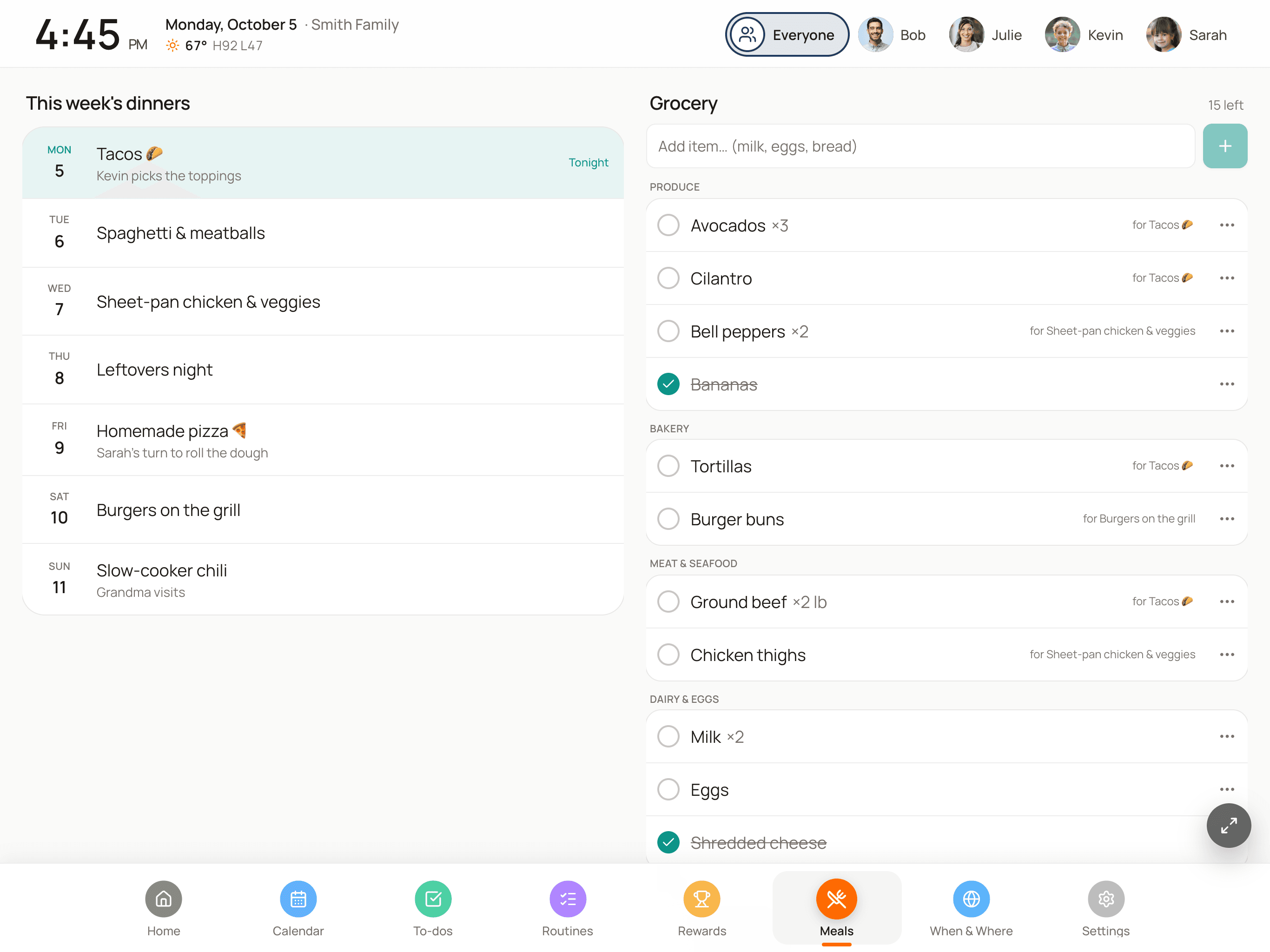
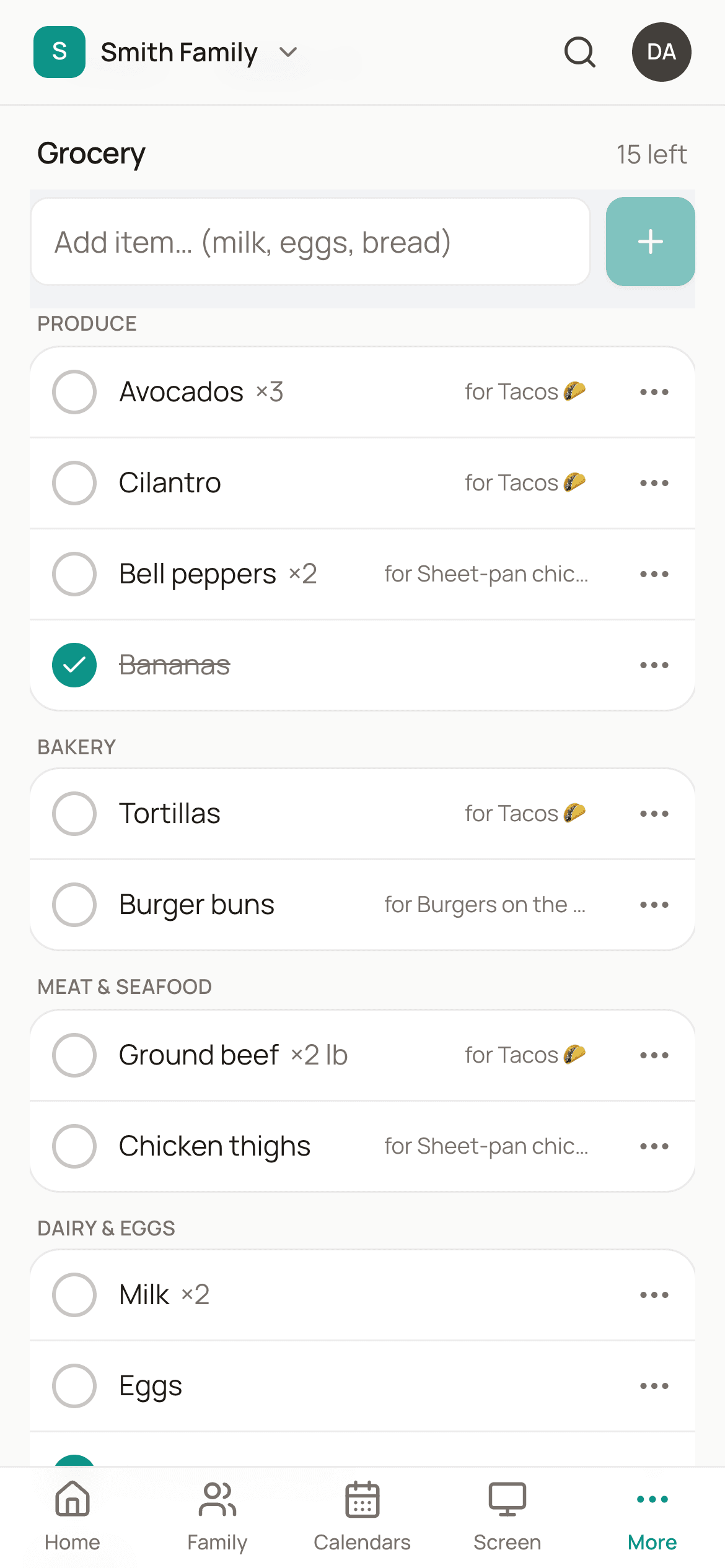
Meals & Grocery is part of Pro, and included in the 14-day trial.
New: When & Where
A map of everywhere your family has been.
When the day’s plan is handled, the wall turns to the bigger picture: the states, countries and national parks you’ve seen together, and who was along for each one.
Catch up in two minutes
Tap the states, countries and national parks you've already been to. For a trip worth remembering, search the place and add the date and who went.
A map for each person
The wall rotates from the family map to one for each of you. Faded states are trips the family took without that person, which kids take as a challenge.
Badges and your own lists
Earn Four Corners, Coast to Coast and Park Ranger as you go. Add lists for MLB ballparks, Disney parks or the New 7 Wonders, or write your own.
Trips replay when the screen is idle
On Pro, add trip photos and the idle display plays them back as a memory tour in three styles, with quiet hours. You can also create pins from the locations in your photos.
The map, check-offs, badges and lists come with every plan. Photos, the memory tour and photo import are part of Pro.
Phones are personal. A family plan has to be seen.
Group texts get buried and calendar apps sit behind lock screens. A screen in the kitchen gets read by everyone, including the kids who don’t have a phone yet.
- Chaotic mornings
- Kids see their routine on the wall and check it off themselves. Nobody yells up the stairs.
- “I didn't know!”
- Practice, pickup and the dentist are on a screen everyone walks past. The plan stops living in one parent's head.
- “What's for dinner?”
- Tonight's dinner is on the wall before anyone asks, and the grocery list is already on your phone.
- Chore battles
- Chores earn points and points earn rewards, so asking turns into a game with a scoreboard.
On the wall in about ten minutes.
Create your account
Start the 14-day trial. No credit card, and your display is ready in a few minutes.
Connect your calendars
Link Google, iCloud, Outlook or any ICS feed, including school calendars and TeamSnap schedules.
Put it where everyone looks
Open your display link on a tablet or TV in the kitchen, entryway or mudroom. Manage it all from your phone.
The iPad app is the best fit for a wall: it runs fullscreen and launches itself when the tablet starts. Android and Fire tablets, TVs and laptops use the same display in a browser.
Two plans. Try all of it first.
The 14-day trial includes every Pro feature. Pick a plan when it ends. There’s no hardware to buy on either one.
Basic
Calendar essentials- Up to 4 family members
- Today view
- Shared calendar essentials
- Travel map, check-offs and badges
- Email support
Pro
Everything on the wall- Unlimited family members
- All layouts
- Routines, to-dos and rewards
- Meal planner and shared grocery list
- Trip photos, memory tour and photo import
- Priority setup help
No credit card to start. Cancel in settings whenever you like. Payments run through Stripe, so we never see or store your card. We’re a small team and we’d rather you try it than read reviews we made up.
Common questions
Any device with a web browser - iPads, Android tablets, laptops, or TVs. We also have a dedicated iPad app for the best experience. Most families mount a tablet on their wall or place it on a kitchen counter.
No. Use any tablet or screen you already have. Got an old iPad sitting in a drawer? It's perfect. A $20 wall mount or a kitchen stand and a charging cable are all you need to keep it on the wall all day.
Connect Google Calendar with one click, or paste any ICS URL (iCloud, Outlook, school calendars, sports schedules from TeamSnap or TeamSideline). Each family member can have their own calendar, plus a shared family calendar.
Yes! That's the whole point. Kids walk up to the display and tap to check off routine items and to-dos. It's so easy to use that everyone in the family actually will use it.
Plan one dinner per night from your phone and the display shows tonight's dinner on its Home screen and the whole week on the Meals tab. The grocery list sorts items into aisles automatically, skips duplicates, and everyone in the household can add to it and check things off in the store. Meals & Grocery is part of Pro.
A map of everywhere your family has been, shown on the display. Tap the states, countries and national parks you've visited, or add a place with its date and who went. The display rotates between the family map and a map for each person, and awards badges like Four Corners and Coast to Coast along the way.
The map, check-offs, scoreboard, badges and custom lists are included on every plan. Trip photos, the memory-tour screensaver and importing pins from your photos' locations are part of Pro.
Everything. Your 14-day trial includes the full FamDisplay experience, including unlimited family members, routines, to-dos, rewards, and all layouts. After the trial, choose Basic ($4.99/mo) for calendar essentials or Pro ($9.99/mo) for the full command center. No credit card required to start.
You're never charged automatically: there's no card on file during the trial. If you don't pick a plan, the display pauses and everything you set up (calendars, family members, routines) stays saved, so choosing a plan later turns it straight back on. You can cancel a paid plan anytime.
Yes. FamDisplay only reads your calendars to show them on your display; it never changes or deletes your events. We don't sell your personal information or show ads, and you can delete your account and data at any time.
We'd love to hear from you! Email us at hello@famdisplay.com for support, partnerships, or just to say hi. We typically respond within 24 hours.
Calmer mornings start with a screen you already own.
Free for 14 days. No credit card. Cancel anytime.