A visual routine chart kids actually follow
Every school morning used to sound the same at our house: “Shoes. SHOES. Did you brush your teeth? Where are your shoes?” Four kids, one dad, a lot of repeating myself.
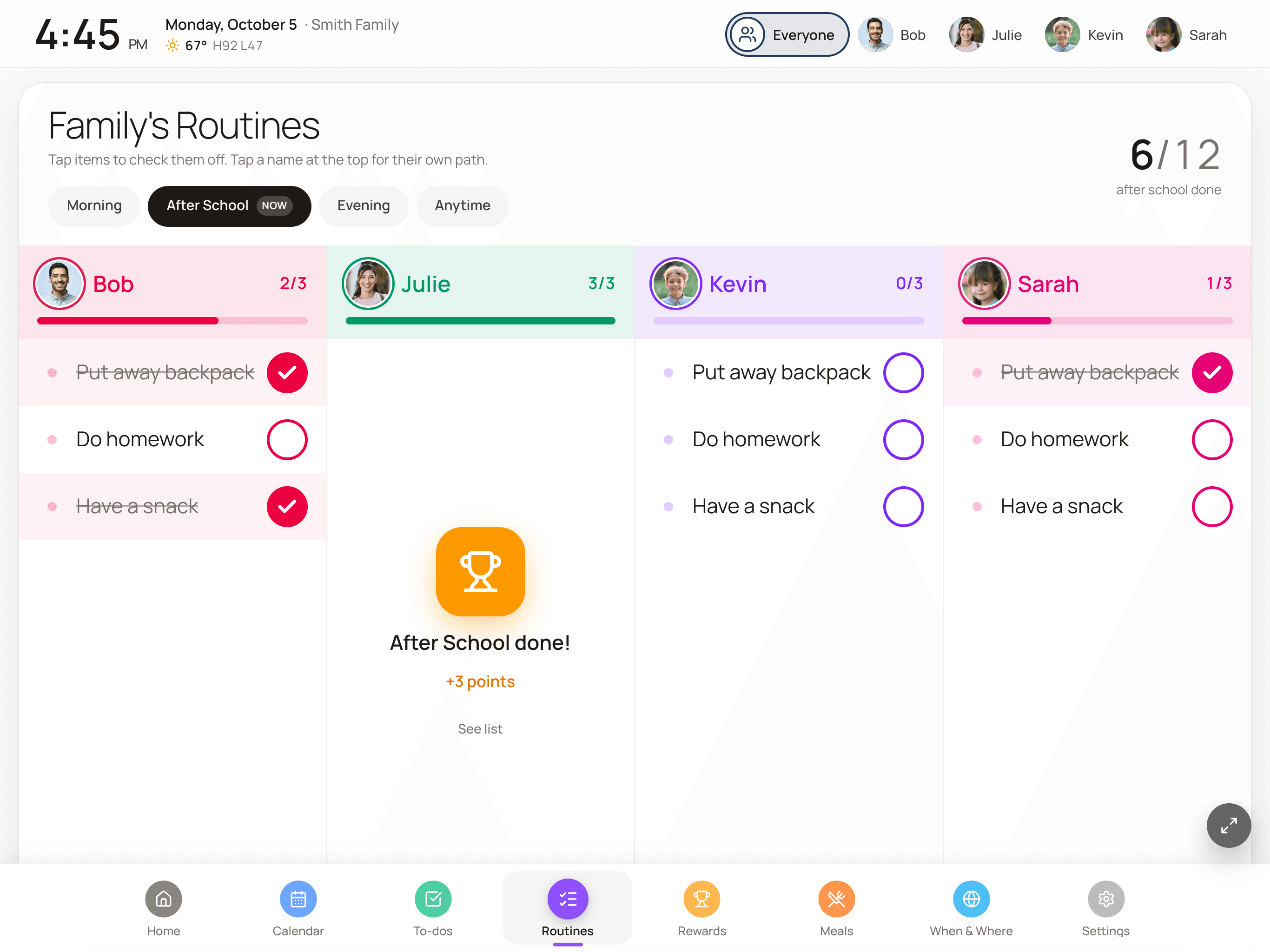
What changed it was putting the routine on the wall where the kids could see it and check it off themselves. FamDisplay’s routine chart shows each kid their own steps for the morning, after school and bedtime, lets them tap each one done, and celebrates when they finish. I stopped being the checklist.
14 days free, no credit card. Then Basic $4.99/mo or Pro $9.99/mo.
Why a visual routine chart helps
Kids don’t forget the routine because they don’t care. They forget because “get ready for school” is really eight small jobs, and holding eight jobs in your head at 7:15 a.m. is hard when you’re seven. A visual routine breaks it into steps they can see, and checking off each one gives them a little win.
It also moves the reminding off your plate. Instead of a parent calling out the next step, the next step is on the wall. You’re still there to help, but the routine belongs to them.
How routines work in FamDisplay
You build routines from your phone, and the wall does the rest:
- Four parts of the day: Morning, After School, Evening and Anytime. The wall marks the part of the day you’re in as NOW, so kids know which list they’re on.
- One column per kid, with a progress bar and a count like 2 of 3, so you can see who’s done from across the room.
- Tap a kid’s name for their own path: big stops in a row, the next step highlighted, and a trophy at the end. It’s our little kids’ favorite view.
- Start a step with an emoji (🦷 Brush teeth, 👟 Shoes on) and the emoji shows as a picture, which helps kids who aren’t reading yet.
- Steps can run only on certain days. “Pack swim bag” can show up on Tuesdays and nowhere else, and a whole routine can skip weekends.
- Steps can be worth points, and finishing a routine sets off a small celebration with the points earned.
- Everything resets for the next day on its own.
Sample routines to start with
These are close to what we use. Keep each routine short; four to six steps is plenty for most kids, and fewer for little ones.
- Morning: get dressed, make bed, eat breakfast, brush teeth, shoes and backpack by the door.
- After school: put away backpack, have a snack, do homework, 20 minutes of reading.
- Bedtime: pick up toys, bath or shower, pajamas on, brush teeth, read a book.
- Anytime: practice piano, feed the pet, water the plants.
Points, rewards and chores
Routine points go into the same balance as chores, and kids spend them in their reward shop on the wall. Every reward request waits for a parent to approve it. The chore chart with rewards page walks through that part.
Points are optional. Some families leave them off for routines and keep them for extra chores. Either works; it’s your call.
Where to put the routine chart
The routine chart needs a screen kids can reach and tap. A tablet near the kitchen or by the door you leave from is ideal. An old iPad or an inexpensive Fire tablet both work. If your family calendar is on the TV, add a tablet at kid height for routines, since nobody’s checking off steps with a remote.
Routines are part of the Pro plan ($9.99/mo), along with to-dos, rewards and meals. The 14-day free trial includes all of it, so you can find out whether your kids take to it before you pay anything.
How to set up a routine chart for your kids
About ten minutes for the first routine. After that, it runs itself.
Add your kids
Start the FamDisplay free trial and add each child. Each one gets their own color and column on the wall.
Create a routine
Add a routine, choose Morning, After School, Evening or Anytime, and pick which kids it’s for.
Add the steps
Add four to six short steps. Start a step with an emoji for kids who aren’t reading yet, and set a step to certain days if it doesn’t happen every day.
Give steps points (optional)
Give steps a point value if you want routines to count toward rewards.
Put it on a tablet at kid height
Open FamDisplay on a tablet the kids can reach. They tap each step as they go, and the routine resets for the next day.
Common questions
What age is a routine chart good for?
Kids who can tap a screen can use it. Emoji steps help pre-readers, and the single-kid path view highlights the next step. Older kids tend to like the progress bars and points.
Does the routine reset every day?
Yes. Checked steps clear for the next day automatically, and steps or routines set to certain days only show up on those days.
Can each child have a different routine?
Yes. Each routine is assigned to the kids it’s for, and each kid gets their own column with their own progress.
Do kids have to earn points for routines?
No. Points are optional per step. If you use them, they add to the same balance kids spend on rewards, and every reward request needs a parent’s approval.
Which plan includes routines?
Routines are part of Pro ($9.99/mo), with to-dos, rewards and meals. The 14-day free trial includes everything, and no credit card is needed to start.
Keep reading
Chores that earn points, and rewards you approve.
Turn a spare iPad into the family screen.
An inexpensive tablet for the routine chart.
The week on the big screen.
Routines on a tablet you own versus a calendar frame.
Calmer mornings start with one routine
Set up a morning routine tonight and let the kids try it tomorrow. Every Pro feature is free for 14 days.
No credit card needed to start.