FamDisplay vs DAKboard
Both turn a screen you own into a wall display. DAKboard is a flexible dashboard you design yourself. FamDisplay is a family command center that is ready the moment your calendars connect. Here is how they compare as of October 2026.
Same idea, different starting point
DAKboard and FamDisplay agree on the big thing: you should not need special hardware to put the family calendar on the wall. Both run in a web browser on a tablet, TV or monitor you already own, and both sell or recommend optional hardware. Where they differ is the job they are built for. DAKboard is a general-purpose dashboard: you lay out blocks for calendars, photos, weather, news, smart home controls and to-do apps, and it is used everywhere from kitchens to offices. FamDisplay is designed around one household: each person gets a color and a lane, kids check off routines and chores on the screen, points turn into rewards, and tonight's dinner and the grocery list sit next to the schedule.
Feature comparison
| Feature | FamDisplay | DAKboard |
|---|---|---|
| Runs on a tablet, TV or browser you own | ||
| Optional dedicated hardware | From $499.95 | |
| Google Calendar sync | ||
| iCloud Calendar sync | ||
| Outlook / Office 365 sync | ||
| Any ICS feed | ||
| Free plan | 1 screen, 2 calendars | |
| Calendars included | 1 per person (Basic), unlimited (Pro) | 2 / 5 / unlimited by plan |
| Family layouts ready out of the box | You design the layout | |
| Per-person color coding | Not listed | |
| Daily routines that reset | Included in Pro | Not listed |
| Chores with points & rewards | Included in Pro | Essential or Plus |
| Built-in meal planner | Included in Pro | Shows meal plans from other apps |
| Shared grocery list | Included in Pro | |
| Family travel map & badges | ||
| Countdowns | Not listed | |
| Weather | ||
| Photo slideshows from many services | Trip photos (Pro) | |
| Smart home controls | ||
| Custom CSS & screen designer | Essential or Plus | |
| Free trial | 14 days, no card needed | Free plan |
| Paid plans | $4.99 or $9.99/mo | $6 or $10/mo ($5 or $8 billed yearly) |
Why families choose FamDisplay
A family display in minutes, not a design project
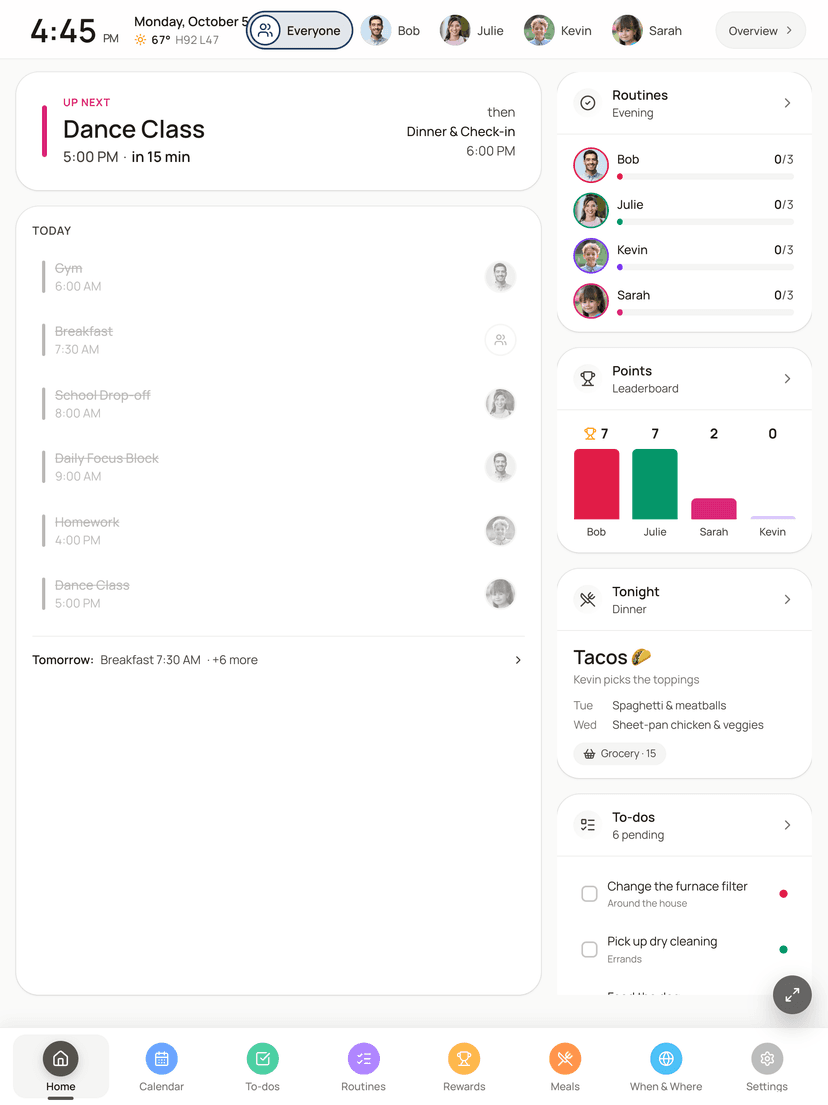
DAKboard's strength is that you can build almost any screen, which also means someone has to build it. FamDisplay starts from the family: create an account, connect Google with one click or paste an ICS link for iCloud, Outlook, school or TeamSnap calendars, add each person, and open your display link on a tablet or TV. The layouts are already designed for a household, so there is nothing to arrange before the screen is useful.
Routines and rewards kids run themselves
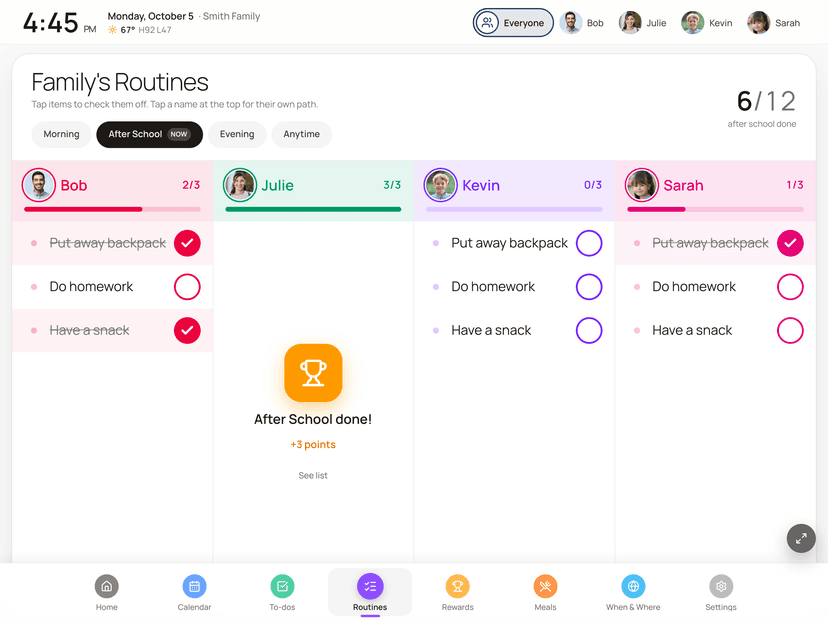
DAKboard added chores with points on its Essential and Plus plans. FamDisplay goes further on the kid side: morning, after-school and bedtime routines that kids tap through on the wall, with a progress bar that fills and resets for tomorrow, plus to-dos for one person or the whole family. Finished routines and to-dos earn points, and you decide what points buy, from screen time to picking Friday's movie.
Meals and groceries without another app
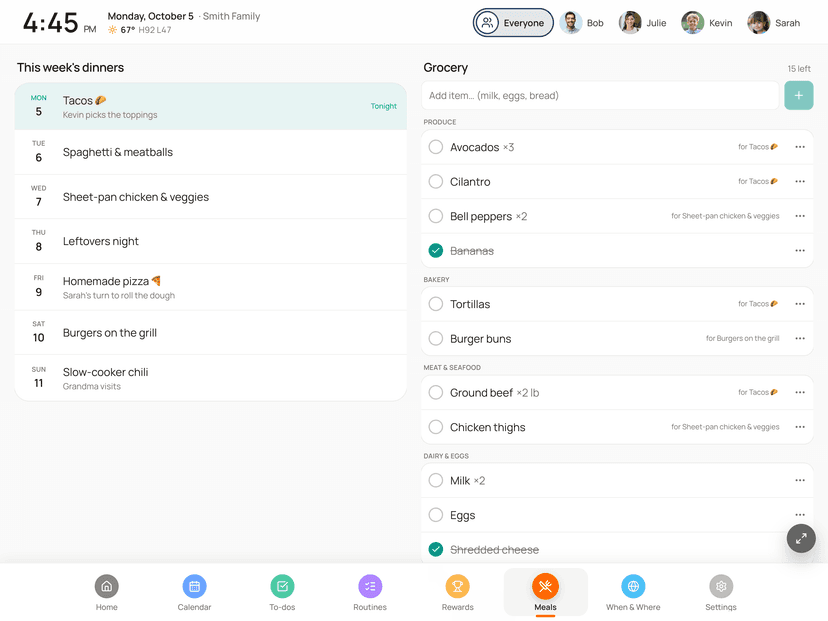
DAKboard can display a meal plan from a separate service like Plan to Eat. FamDisplay Pro has the planner built in: tap a night on your phone and type what's for dinner, tonight's meal shows on the display's Home screen, and the grocery list sorts itself into aisles and updates on everyone's phone while you shop.
A map of everywhere your family has been
FamDisplay includes When & Where, a travel map on the display. Tap the states, countries and national parks you have visited, add trips with dates and who went, and the screen rotates between the family map and a map for each person, earning badges like Four Corners and Coast to Coast. It comes with every plan.
Where DAKboard is the better pick
DAKboard has a free plan, and FamDisplay does not (it has a 14-day free trial instead). If you want a dashboard for more than family life, such as smart home controls through Home Assistant, SmartThings or Nest, photo slideshows from Google Photos, Apple Photos or Dropbox, news, stocks or package tracking, DAKboard does far more. Tinkerers who like custom CSS, Raspberry Pi builds and pixel-level layout control will feel at home there. Choose FamDisplay when the goal is a calm, family-first screen that everyone, including the kids, actually uses every day.
Common questions
They are close. As of October 2026, DAKboard has a free plan, Essential at $6 a month ($5 billed yearly) and Plus at $10 a month ($8 billed yearly). FamDisplay Basic is $4.99 a month ($49.99 a year) and Pro is $9.99 a month ($99.99 a year). Neither requires hardware, though DAKboard also sells wall displays starting at $499.95.
Usually, yes. FamDisplay runs in any modern web browser, so a tablet, smart TV or monitor that runs DAKboard can open your FamDisplay link. On an iPad, the FamDisplay app runs fullscreen and launches itself when the tablet starts.
Yes. FamDisplay Pro includes chores and to-dos you assign to one person or the whole family, daily routines that reset each morning, and points that kids redeem for rewards you choose. All of it is included in the 14-day free trial.
No. FamDisplay focuses on the family schedule, routines, chores, meals and the travel map. Pro adds trip photos that replay as a memory tour when the screen is idle, but there is no smart home control or general photo-service slideshow. If those matter most, DAKboard is the stronger choice.
Your events live in Google, iCloud or Outlook, so switching is mostly reconnecting them. Start a free FamDisplay trial, connect Google or paste your ICS links, add family members, then open your display link in the same browser or device. You can keep DAKboard running while you try it.
Ready to try FamDisplay?
See why families are switching from DAKboard to FamDisplay.
Start your free trial